

Have you ever used your office photo copy machine to scan important personal document? like your credit card, income tax papers, social security document, medical records, bank records etc. If the answer is yes then you have a potential threat of these critical data to be stolen.
Did you know most of the digital copier built after 2002 has a build in hard drive and it stores an image of every documents copied, scanned or emailed by the machine on the copier's hard drive. This makes any office copy machine packed with highly-personal or sensitive data and a potential digital time-bomb.
Over a period of time most of the office copier machine are sold out to third party vendors and if somebody is in a identity theft business it seems this machine would be a pot of gold. Retrieving images and data from the copier's hard drive is a very simple process.
Advanced technology has opened a dangerous hole in data security, specific precautions can help to minimize risk. The first step could be sharing this awareness.
Also get your office IT dept. to periodically clean the copier's hard drive data.
Apple , Microsoft , Dell XPS , Sony , Intel , AMD , Nokia , LG , Maruti , IBM , Titan , Samsung , Electronic , technology, movies , DVD , IMAX , Science , Cricket , Sports , Software , Hardware , PC Games, Hero Honda, pulsar , Mtv , V , Friends.
Showing posts with label teknomania. Show all posts
Showing posts with label teknomania. Show all posts
Indian Government may ban Gmail in India... Unbelievable ? but it might happen if Gmail does not agree to make data going through their networks available to the Indian security agencies in a readable format. The data services being offered by companies like Gmail and Skype are highly encrypted because of which Indian security agencies are finding it difficult to keep a watch over the content being transmitted through them. The Government has also decided to amend the IT laws would force companies such as Skype to give complete access to their networks or set up a local server in India to allow security agencies to track content.
After China-made telecommunication equipment, after bringing the satellite-based mobile communication services under tighter security norms, it probably time for internet.
Apple , Microsoft , Dell XPS , Sony , Intel , AMD , Nokia , LG , Maruti , IBM , Titan , Samsung , Electronic , technology, movies , DVD , IMAX , Science , Cricket , Sports , Software , Hardware , PC Games, Hero Honda, pulsar , Mtv , V , Friends , Yahoo , Gmail , Facebook , Education , Games
 The Government has also decided to amend the IT laws would force companies such as Skype to give complete access to their networks or set up a local server in India to allow security agencies to track content.
After China-made telecommunication equipment, after bringing the satellite-based mobile communication services under tighter security norms, it probably time for internet.
Apple , Microsoft , Dell XPS , Sony , Intel , AMD , Nokia , LG , Maruti , IBM , Titan , Samsung , Electronic , technology, movies , DVD , IMAX , Science , Cricket , Sports , Software , Hardware , PC Games, Hero Honda, pulsar , Mtv , V , Friends , Yahoo , Gmail , Facebook , Education , Games
Category:
Technology,
teknomania
0
comments

Till this date, Microsoft’s windows had two options for the memory requirement of the computer, so that the computing can be done at cheaper rates and that too without installing the physical memory.
1. Physical Memory (RAM)
2. Page File (A virtual memory file, stored on hard disk).
The page file is used by the Windows OS to cater the needs of various applications when the physical memory is fully used up. The reason for that is, that Virtual memory is slower as compared to the physical memory and thus Phyical memory takes the first priority.
However, with the release of Windows Vista, Microsoft has introduced a new technology called ReadyBoost. With the help of this technology one can use any Flash drive, SD Cards, CF Cards as the third memory option for the computer.
Now, the benefits of Flash Drive or Cards as a source of Memory :
1. It is faster than the virtual memory which is accessed through the hard disk drive.
2. It is cheaper as compared to the actually Physical Memory.
How can it be activated ?
In order to activate the ReadyBoost technology on your FlashDrive or Memory Cards, you have to follow these steps…
1. Open My Computer.
2. Right Click on the Removable Disk Drive and select Properties.
3. Click on ReadyBoost Tab.
4. Enable the feature by selecting the option and allocate the amount of space you want to use as memory.
Things to be noted….
1. Regardless of the fact that you use Readyboost or not, you need at least 512 Mb of memory to run Windows Vista decently.
2. If your device is not giving the option of ReadyBoost then it means that it doesn’t clear up the minimum data trasfer rate required by ReadBoost technology.
1. Physical Memory (RAM)
2. Page File (A virtual memory file, stored on hard disk).
The page file is used by the Windows OS to cater the needs of various applications when the physical memory is fully used up. The reason for that is, that Virtual memory is slower as compared to the physical memory and thus Phyical memory takes the first priority.
However, with the release of Windows Vista, Microsoft has introduced a new technology called ReadyBoost. With the help of this technology one can use any Flash drive, SD Cards, CF Cards as the third memory option for the computer.
Now, the benefits of Flash Drive or Cards as a source of Memory :
1. It is faster than the virtual memory which is accessed through the hard disk drive.
2. It is cheaper as compared to the actually Physical Memory.
How can it be activated ?
In order to activate the ReadyBoost technology on your FlashDrive or Memory Cards, you have to follow these steps…
1. Open My Computer.
2. Right Click on the Removable Disk Drive and select Properties.
3. Click on ReadyBoost Tab.
4. Enable the feature by selecting the option and allocate the amount of space you want to use as memory.
Things to be noted….
1. Regardless of the fact that you use Readyboost or not, you need at least 512 Mb of memory to run Windows Vista decently.
2. If your device is not giving the option of ReadyBoost then it means that it doesn’t clear up the minimum data trasfer rate required by ReadBoost technology.
Category:
Technology,
teknomania
0
comments
GeoEye-1 satellite was launched on on September 6, at the time of its launch GeoEye-1 was the world’s highest resolution commercial earth-imaging satellite. The National Geospatial-Intelligence Agen cy and Google both paid $502 million for the satellite.
While GeoEye-1 is capable of imagery with details the size of 41 centimetres (16 in), Google will have access to details of 50 centimetres (20 in). The GeoEye-1 is set to serve not only Google but also the US government.
On October 10th GeoEye-1 released its first ever shot images which is of Kutzton University in Pennsylvania. Heres the image...
With Google having access to such high resolution images Google Maps and Google Earth are about to get that much sweeter. Way to gooo.. Google.
Take a look at some more exclusive images from GeoEye here
 cy and Google both paid $502 million for the satellite.
While GeoEye-1 is capable of imagery with details the size of 41 centimetres (16 in), Google will have access to details of 50 centimetres (20 in). The GeoEye-1 is set to serve not only Google but also the US government.
On October 10th GeoEye-1 released its first ever shot images which is of Kutzton University in Pennsylvania. Heres the image...
With Google having access to such high resolution images Google Maps and Google Earth are about to get that much sweeter. Way to gooo.. Google.
Take a look at some more exclusive images from GeoEye here
Category:
Technology,
teknomania
0
comments
When you do a Google search, you're instantly presented with a list of results from all over the web. How does Google find web pages matching your query, and determine the order of search results? Also how does google understands exactly what you mean and gives you back exactly what you want. Well they use something called PageRank™ technology.
What is this PageRank Technology ? Well, PageRank reflects our view of the importance of web pages by considering more than 500 million variables and 2 billion terms. Pages that we believe are important pages receive a higher PageRank and are more likely to appear at the top of the search results.
PageRank also considers the importance of each page that casts a vote, as votes from some pages are considered to have greater value, thus giving the linked page greater value. We have always taken a pragmatic approach to help improve search quality and create useful products, and our technology uses the collective intelligence of the web to determine a page's importance.
In general, webmasters can improve the rank of their sites by increasing the number of high-quality sites that link to their pages and thus they become more google friendly and their pages are listed more on google search.
Use this free tool to display your PageRank as a button in your blog template. This could also help you find the current page rank of any website you want to check, including yours.
Just enter your blog's URL in the box below and click "submit". You will then be shown the various button styles you can use. Choose your button and the code for your PageRank display button will be generated below.
You can then copy the code into an HTML/Javascript widget in your sidebar, or paste into your template where you would like the button to appear.
What is this PageRank Technology ? Well, PageRank reflects our view of the
 importance of web pages by considering more than 500 million variables and 2 billion terms. Pages that we believe are important pages receive a higher PageRank and are more likely to appear at the top of the search results.
PageRank also considers the importance of each page that casts a vote, as votes from some pages are considered to have greater value, thus giving the linked page greater value. We have always taken a pragmatic approach to help improve search quality and create useful products, and our technology uses the collective intelligence of the web to determine a page's importance.
In general, webmasters can improve the rank of their sites by increasing the number of high-quality sites that link to their pages and thus they become more google friendly and their pages are listed more on google search.
Use this free tool to display your PageRank as a button in your blog template. This could also help you find the current page rank of any website you want to check, including yours.
Just enter your blog's URL in the box below and click "submit". You will then be shown the various button styles you can use. Choose your button and the code for your PageRank display button will be generated below.
You can then copy the code into an HTML/Javascript widget in your sidebar, or paste into your template where you would like the button to appear.
Category:
Technology,
teknomania
0
comments
The much awaited iPhone 2.0 Pwnage Tool is now available on the internet. If you are aware of the jailbreak process  released on the internet early this year, then this tool could be very usefull.
This 20 MB zip file is released by the iPhone Dev Blog very recently. As per this "unofficial" official blog of the "iphone-dev team" this tool unlocks and jailbreaks older iPhones with 2.0 firmwares, it also jailbreaks iPhone 3G and iPod Touch with 2.0 firmwares.
 released on the internet early this year, then this tool could be very usefull.
This 20 MB zip file is released by the iPhone Dev Blog very recently. As per this "unofficial" official blog of the "iphone-dev team" this tool unlocks and jailbreaks older iPhones with 2.0 firmwares, it also jailbreaks iPhone 3G and iPod Touch with 2.0 firmwares.
Category:
Technology,
teknomania
0
comments
When it comes to Tech CEOs we know we are usually going to see something odd ... they are exorbitantly paid!!! Topping the list of h ighest paid CEOs is Lawrence Ellison of Oracle. Heres' the list in ranking sequence.
Name: Lawrence Ellison
Company: Oracle.
Annual compensation: $192.9 million
Name: Nabeel Gareeb
Company: MEMC Electronic Materials
Annual compensation: $79.6 million
Name: John Chambers
Company: Cisco Systems
Annual compensation: $54.8 million
Name: Mark Hurd
Company: Hewlett-Packard
Annual compensation: $27.6 million
Name: Jen-Hsun Huang
Company: NVIDIA
Annual compensation: $24.6 million
Name: Samuel Palmisano
Company: IBM
Annual compensation: $24.3 million
Name: Wendell Weeks
Company: Corning
Annual compensation: $22.6 million
Name: Joseph Tucci
Company: EMC
Annual compensation: $20 million
Name: William Sullivan
Company: Agilent Technologies
Annual compensation: $17.4 million
Name: Paul Otellini
Company: Intel
One-year compensation: $16.3 million
Name: Steven Jobs
Company: Apple
Annual compensation: $14.6 million
Name: Jonathan Schwartz
Company: Sun Microsystems
Annual compensation: $13.5 million
 ighest paid CEOs is Lawrence Ellison of Oracle. Heres' the list in ranking sequence.
Name: Lawrence Ellison
Company: Oracle.
Annual compensation: $192.9 million
Name: Nabeel Gareeb
Company: MEMC Electronic Materials
Annual compensation: $79.6 million
Name: John Chambers
Company: Cisco Systems
Annual compensation: $54.8 million
Name: Mark Hurd
Company: Hewlett-Packard
Annual compensation: $27.6 million
Name: Jen-Hsun Huang
Company: NVIDIA
Annual compensation: $24.6 million
Name: Samuel Palmisano
Company: IBM
Annual compensation: $24.3 million
Name: Wendell Weeks
Company: Corning
Annual compensation: $22.6 million
Name: Joseph Tucci
Company: EMC
Annual compensation: $20 million
Name: William Sullivan
Company: Agilent Technologies
Annual compensation: $17.4 million
Name: Paul Otellini
Company: Intel
One-year compensation: $16.3 million
Name: Steven Jobs
Company: Apple
Annual compensation: $14.6 million
Name: Jonathan Schwartz
Company: Sun Microsystems
Annual compensation: $13.5 million
Category:
Technology,
teknomania
0
comments
Intel recently announced it’s 6 core Xeon high performance processors which is based on it’s 45 nm process technology and is code named 7400 based on the Dunnington core, which is the last of the Penryn series. Intel designed the new Xeon process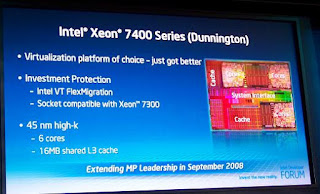 or for medium ranged companies for mostly data centers and Virtual Machines.
Xeon provides increased scalability and memory resources as well as greater reliability for data centers. These initial chips will be designed for Servers and not Desktops.
Intel’s Xeon quad-core offerings have already eroded AMD’s server market share. Part of the problem has been AMD’s inability to deliver it’s Barcelona quad core processor on time due to technical snags.
Some of the vendors already announcing Xeon 7400 servers include Sun Microsystems, HP, Dell, IBM, and Unisys. But what has this got to do with the average customer? Well nothing really, except don't be surprised to see 6 core desktop variants maybe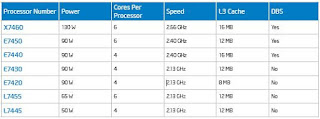 as soon as next year.
Pricing for this Xeon® 7000 sequence processors in quantities of 1,000 ranges from $856 to $2,729.
 or for medium ranged companies for mostly data centers and Virtual Machines.
Xeon provides increased scalability and memory resources as well as greater reliability for data centers. These initial chips will be designed for Servers and not Desktops.
Intel’s Xeon quad-core offerings have already eroded AMD’s server market share. Part of the problem has been AMD’s inability to deliver it’s Barcelona quad core processor on time due to technical snags.
Some of the vendors already announcing Xeon 7400 servers include Sun Microsystems, HP, Dell, IBM, and Unisys. But what has this got to do with the average customer? Well nothing really, except don't be surprised to see 6 core desktop variants maybe
 as soon as next year.
Pricing for this Xeon® 7000 sequence processors in quantities of 1,000 ranges from $856 to $2,729.
Category:
Technology,
teknomania
0
comments
GAME IN MS EXCEL
Hidden game in MS excel
1.Open Ms Excel
2. In the First Cell of THe Worksheet press spacebar and then on the file menu clik on "Save As Web page"
3.Click On THe Selection Sheet Radio button and then click on "add interactively"...
4.Save the File
5.open the file ull see a Excel Sheet....
6.With the Help of Page Down on ur keyboard point to Row Number 2000
7.Then Point to Column "WC"
8.Go To the Column WC such That It is on the extreme left of ur screen
9.Click on 2000 Such that whole row is selected
10.While Pressing CTRL+ALT+SHIFT CLik on The "Microsoft office" Logo on the same sheet on the extreme left of your Sheet....
11.There u r with your game.....
Hidden game in MS excel
1.Open Ms Excel
2. In the First Cell of THe Worksheet press spacebar and then on the file menu clik on "Save As Web page"
3.Click On THe Selection Sheet Radio button and then click on "add interactively"...
4.Save the File
5.open the file ull see a Excel Sheet....
6.With the Help of Page Down on ur keyboard point to Row Number 2000
7.Then Point to Column "WC"
8.Go To the Column WC such That It is on the extreme left of ur screen
9.Click on 2000 Such that whole row is selected
10.While Pressing CTRL+ALT+SHIFT CLik on The "Microsoft office" Logo on the same sheet on the extreme left of your Sheet....
11.There u r with your game.....
Category:
Technology,
teknomania
0
comments
ya ms office had a inbuild password security feture.
to access it go to tools menu->options.
in the options menu go to security tab.
there u can see password to open and password to modify.
password to open prevent unauthrosied persons to open it where as password to modify will make open the document but prevents changing/modifing the content of it.
(the above is for office 2003)
in case of office 2007 click on the office button (fount in top left corner)
and prepare->there u can select encrypt document or restrict permission depending ur needs.
to access it go to tools menu->options.
in the options menu go to security tab.
there u can see password to open and password to modify.
password to open prevent unauthrosied persons to open it where as password to modify will make open the document but prevents changing/modifing the content of it.
(the above is for office 2003)
in case of office 2007 click on the office button (fount in top left corner)
and prepare->there u can select encrypt document or restrict permission depending ur needs.
Category:
Technology,
teknomania
0
comments
Change the Browser Title
This tweak Customize the Title of the Internet Explorer.
1. Click Start > Run > Type gpedit.msc
2. Click User Configuration > Windows Setting > Internet Explorer Maintenance > Browser User Interface
3. Double click on Browser Title
4. Click on Customize Title Bars
5. type in whatever you want
6. Click OK
This tweak Customize the Title of the Internet Explorer.
1. Click Start > Run > Type gpedit.msc
2. Click User Configuration > Windows Setting > Internet Explorer Maintenance > Browser User Interface
3. Double click on Browser Title
4. Click on Customize Title Bars
5. type in whatever you want
6. Click OK
Category:
Technology,
teknomania
0
comments
- They are located in the c:\windows\system32 directory, and have the file type extension ".CPL".
ACCESS.CPL - Accessibility Options
APPWIZ.CPL - Add or Remove Programs
DESK.CPL - Display Properties
HDWWIZ.CPL - Add Hardware Wizard
INETCPL.CPL - Internet Explorer Properties
INTL.CPL - Regional and Language Options
JOY.CPL - Game Controllers
MAIN.CPL - Mouse Properties
MMSYS.CPL - Sounds and Audio Device Properties
NCPA.CPL - Network Connections
NUSRMGR.CPL - User Accounts
ODBCCP32.CPL - ODBC Data Source Administrator
POWERCFG.CPL - Power Options Properties
SYSDM.CPL - System Properties
TELEPHON.CPL - Phone and Modem Options
TIMEDATE.CPL - Date and Time Properties
- The following are Microsoft Management Console Snap-ins that can be opened from the run line. These applications have the file type extension ".MSC".
CERTMGR.MSC - Certificates
CIADV.MSC - Indexing Service
COMPMGMT.MSC - Computer Management
DEVMGMT.MSC - Device Manager
DFRG.MSC - Disk Defragmenter
DISKMGMT.MSC - Disk Management
EVENTVWR.MSC - Event Viewer
FSMGMT.MSC - Shared Folders
LUSRMGR.MSC - Local Users and Groups
NTMSMGR.MSC - Removable Storage
NTMSOPRQ.MSC - Removable Storage Operator Requests
PERFMON.MSC - Performance Monitor
SERVICES.MSC - Services
WMIMGMT.MSC - Windows Management Infrastructure
Category:
Technology,
teknomania
0
comments
Symptoms:
- You are surfing the internet or are engaged any type of Internet activity when suddenly all your Network activity goes to hault. You can still see the Internet connected icon in the tray but you cannot surf, browse or do anything.
- You get an error message something like “Generic Host Process for Win32 Services has encountered a problem and needs to close. We are sorry for the inconvenience.”
- Error message reporting about faulting netapi32.dll and svchost.exe.
- You try to disconnect your Internet because of no activity observed but the Internet icon wont disappear.
- You recieve an error message something like “Your PC has recovered from a serious problem” etc.
Solution:
Follow these simple steps:-
Close Port 445:
1. Start Registry Editor (Regedit.exe) by clicking Start menu, and then click the Run icon.
2. In the small box that Opens, type: regedit then click the OK button. The Registry Editor will now have opened.
3. Locate the following key in the registry:
HKEY_LOCAL_MACHINE\System\CurrentControlSet\Services\NetBT\Parameters
In the right-hand side of the window find an option called TransportBindName.
Double click that value, and then delete the default value, thus giving it a blank value.
Close Port 135:
1. Then you must now navigate to the following registry key: HKEY_LOCAL_MACHINE\Software\Microsoft\OLE2. You will see there is a String Value called: EnableDCOM Set the value to: N (it should currently be Y)
3. Close the Registry Editor. Shutdown and Restart your computer.
Category:
Technology,
teknomania
0
comments
All the files you open will be stored in your user profile in a hidden folder named My Recent Documents. This is really annoying and a treat to our privacy! We can make this folder auto cleared on logoff using a single registry change.
1. Click Start > Run > Type in regedit
2. In the Registry editor navigate to the following key.
HKEY_Current_User > Software > Microsoft > Windows > CurrentVersion > Policies > Explorer
3. Right click on the Right Pane > New > Dword Value & name it as ClearRecentDocsOnExit .
4. Double Click on it & se the value to 1 .
This will clear the My Recent Documents Folder automatically on logoff.
To Revert back either delete the Dword value or set the value to 0.
1. Click Start > Run > Type in regedit
2. In the Registry editor navigate to the following key.
HKEY_Current_User > Software > Microsoft > Windows > CurrentVersion > Policies > Explorer
3. Right click on the Right Pane > New > Dword Value & name it as ClearRecentDocsOnExit .
4. Double Click on it & se the value to 1 .
This will clear the My Recent Documents Folder automatically on logoff.
To Revert back either delete the Dword value or set the value to 0.
Category:
Technology,
teknomania
0
comments

RRT Remove Restrictions Tool
This software helps you to enable task manager, folder options , Registry(regedit) and many more....
Category:
Technology,
teknomania
0
comments
follow the following steps:-
1. go to run.
2. type "telnet towel.blinkenlights.nl" without the quotes("").
After you do that you will see star wars movie played out in ASCII art... its pretty cool!
1. go to run.
2. type "telnet towel.blinkenlights.nl" without the quotes("").
After you do that you will see star wars movie played out in ASCII art... its pretty cool!
Category:
Technology,
teknomania
0
comments
Before you uninstall Internet Explorer, get Mozilla Firefox.
Now, that you have an alternate better browser, getting rid of Internet Explorer should be a matter of seconds.
Hit Start
---> Control Panel
---> Add Remove Programs
---> Add/Remove Windows Components (left column)
---> Un-check Internet Explorer
---> Next
---> Finish
Now, that you have an alternate better browser, getting rid of Internet Explorer should be a matter of seconds.
Hit Start
---> Control Panel
---> Add Remove Programs
---> Add/Remove Windows Components (left column)
---> Un-check Internet Explorer
---> Next
---> Finish
Category:
Technology,
teknomania
0
comments
Goto->Control Panel
---->Performance and maintenance
---->Administrative tools
---->Services
---->Go to every service EXCEPT
+ Application Layer Gateway Service
+ Application Management
+ Automatic Updates
+ Backround Intelligent Transfer Service
+ Cryptographic Services
+ DHCP Client
+ Event Log
+ Help and support
+ Human Interface Device Access
+ Internet Connection Firewall
+ Network Connections
+ Network Location Awareness (NLA)
+ Plug and Play
+ Print Spooler (if you have printers)
+ Remote Access Connection Manager
+ Remote Procedure Call (RPC)
+ System Event Notification
+ Task Scheduler
+ Telephony
+ Themes (hey, you don't want to shutdown cute themes right?)
+ Windows Audio
+ Windows Image Acquisition (if you have scanners or digital cameras attached)
+ Windows Installer
+ Windows Management Instrumentation
+ Windows Management Instrumentation Driver Extensions
------> Double click with left mouse button or click right mouse button and select "Properties"
-------> Startup type
--------> Set to: Disabled
-----> Go to
+ Automatic Updates
------> Startup type
-------> Set to: Automatic
NOTE:You should do it at ur own risk.
In general it wont harm your system but if u do any thing wrong it may mess-up your system.
---->Performance and maintenance
---->Administrative tools
---->Services
---->Go to every service EXCEPT
+ Application Layer Gateway Service
+ Application Management
+ Automatic Updates
+ Backround Intelligent Transfer Service
+ Cryptographic Services
+ DHCP Client
+ Event Log
+ Help and support
+ Human Interface Device Access
+ Internet Connection Firewall
+ Network Connections
+ Network Location Awareness (NLA)
+ Plug and Play
+ Print Spooler (if you have printers)
+ Remote Access Connection Manager
+ Remote Procedure Call (RPC)
+ System Event Notification
+ Task Scheduler
+ Telephony
+ Themes (hey, you don't want to shutdown cute themes right?)
+ Windows Audio
+ Windows Image Acquisition (if you have scanners or digital cameras attached)
+ Windows Installer
+ Windows Management Instrumentation
+ Windows Management Instrumentation Driver Extensions
------> Double click with left mouse button or click right mouse button and select "Properties"
-------> Startup type
--------> Set to: Disabled
-----> Go to
+ Automatic Updates
------> Startup type
-------> Set to: Automatic
NOTE:You should do it at ur own risk.
In general it wont harm your system but if u do any thing wrong it may mess-up your system.
Category:
Technology,
teknomania
0
comments
ZAPAK.COM introduces zapak gamecard..this is the first gaming card introduced in india..concept is so simple.You have to log onto www.zapakgamecard.com, you will get a list of 50+ games,one can play each game for 1 hour which is absolutely free.one can download full version of a particular game through this card.Each game card costs RS 99/ only,this game card is very similar to recharge coupon. You have to scratch the back portion of the card to download the game.
Category:
Technology,
teknomania
1 comments
1. Boot the computer using the XP CD. You may need to change the
boot order in the system BIOS. Check your system documentation
for steps to access the BIOS and change the boot order.
2. When you see the "Welcome To Setup" screen, you will see the
options below This portion of the Setup program prepares Microsoft
Windows XP to run on your computer:
To setup Windows XP now, press ENTER.
To repair a Windows XP installation using Recovery Console, press R.
To quit Setup without installing Windows XP, press F3.
3. Press Enter to start the Windows Setup.
do not choose "To repair a Windows XP installation using the
Recovery Console, press R", (you do not want to load Recovery
Console). I repeat, do not choose "To repair a Windows XP
installation using the Recovery Console, press R".
4. Accept the License Agreement and Windows will search for existing
Windows installations.
5. Select the XP installation you want to repair from the list and
press R to start the repair.
6. Setup will copy the necessary files to the hard drive and reboot.
Do not press any key to boot from CD when the message appears.
Setup will continue as if it were doing a clean install, but your
applications and settings will remain intact.
boot order in the system BIOS. Check your system documentation
for steps to access the BIOS and change the boot order.
2. When you see the "Welcome To Setup" screen, you will see the
options below This portion of the Setup program prepares Microsoft
Windows XP to run on your computer:
To setup Windows XP now, press ENTER.
To repair a Windows XP installation using Recovery Console, press R.
To quit Setup without installing Windows XP, press F3.
3. Press Enter to start the Windows Setup.
do not choose "To repair a Windows XP installation using the
Recovery Console, press R", (you do not want to load Recovery
Console). I repeat, do not choose "To repair a Windows XP
installation using the Recovery Console, press R".
4. Accept the License Agreement and Windows will search for existing
Windows installations.
5. Select the XP installation you want to repair from the list and
press R to start the repair.
6. Setup will copy the necessary files to the hard drive and reboot.
Do not press any key to boot from CD when the message appears.
Setup will continue as if it were doing a clean install, but your
applications and settings will remain intact.
Category:
Technology,
teknomania
0
comments
Subscribe to:
Posts (Atom)